nanuq: from bear blog to json, markdown, or a static site
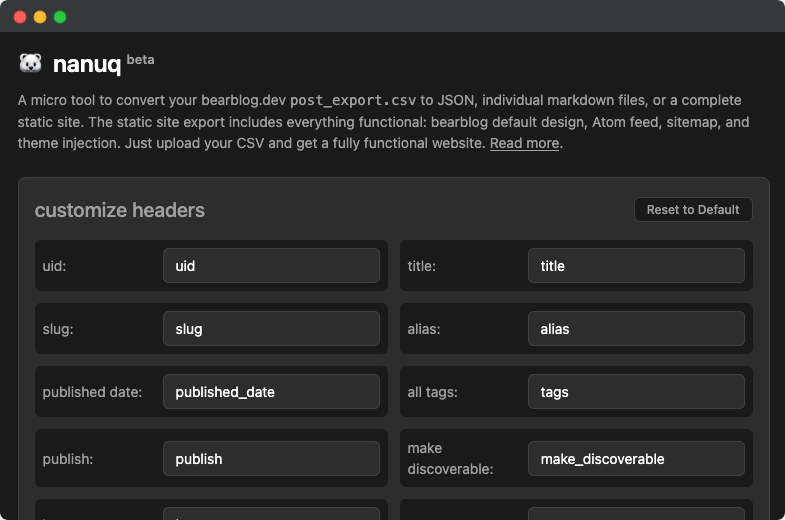
I previously made a [micro tool](/micro-tool-to-convert-bear-blog-csv-exports-to-markdown-files/) to convert post exports to Markdown, but decided to expand it further. So here's [nanuq](https://mgx.me/nanuq/), a micro tool to convert your bearblog.dev `post_export.csv` to JSON, individual Markdown files, or a complete static site. The static site export includes everything functional: bearblog default design, Atom feed, sitemap, and theme injection.
> **Note**: nanuq isn’t about moving away from bear blog -- it’s simply a quick way to back up and repurpose your posts while keeping them accessible in multiple formats. Bear still doesn’t support Markdown exports, and while all of this could be done with scripts, I thought it’d be fun to put together a GUI to make the process easier for everyone.
## Example site
[nano.mgx.me](https://nano.mgx.me)
## Features
- 🔄 Convert CSV to JSON
- 📝 Export individual markdown files
- 🌐 Generate a complete static site
- 🎨 Inject bear blog themes
- 📰 Atom feed generation
- 🗺️ Sitemap generation
- 📜 Custom JavaScript injection
## Usage
1. Visit [mgx.me/nanuq](https://mgx.me/nanuq/)
2. Upload your `post_export.csv` file [from bearblog.dev](https://static.mgx.me/images/2024/bearblogsettings.jpg)
3. Choose your export format:
- JSON: Get a single JSON file with all your posts
- Markdown Files: Get individual markdown files for each post
- Static Site: Get a complete, ready-to-deploy website
## Export Formats
### JSON Export
- Single JSON file containing all posts
- Maintains default or user-configured post metadata
- Easy to import into other systems
### Markdown Export
- Individual markdown files for each post
- Includes default or user-configured front matter with metadata
- Files named with date and slug (e.g., `2024-03-20-my-post.md`)
#### Customizing Headers
You can customize the column headers in your export to match your existing static site generator setup. This is particularly useful if you want to:
- Import your bear posts into another SSG (like Hugo, Jekyll, or Astro)
- Match your existing front matter structure
To customize headers:
1. In the "customize headers" section, modify the header names to match your target SSG's expected format
2. In the "select fields to include" section, choose which fields to export
3. Click "Reset to Default" to restore original headers
#### Fields to Include
The "select fields to include" section allows you to choose which fields from your CSV export will be included in the final JSON or markdown output. This is useful when you want to:
- Keep only the essential metadata for your static site
- Reduce the size of your export files
By default, all fields are selected. You can:
1. Uncheck fields you don't want to include
2. Use the "Reset to Default" button to restore all fields
3. Your selection is saved in the browser for future use
#### JSON Export Example
When exporting to JSON, only the selected fields will be included in the output. This reduces payload size and simplifies data handling. For example:
```json
{
"posts": [
{
"title": "My Post",
"meta_description": "meta description",
"tags": "tags here",
"content": "...",
"published date": "2024-03-20T"
}
]
}
```
### Static Site Export
nanuq creates a complete, ready-to-host website from your `post_export.csv`
- Includes:
- Atom feed (available at /feed)
- Sitemap (available at /sitemap.xml)
- SEO meta tags
- Customizable navigation
- Customizable footer
- Full bearblog.dev CSS compatibility
- Custom JavaScript injection
#### Static Site Export Options
When exporting as a static site, you can customize:
- **Site Title**: The name of your blog
- **Site Domain**: Your website's URL (e.g., https://example.com)
> **Important**: This setting is crucial for RSS feed and sitemap generation. Without setting your actual domain, these files will default to the web worker's domain or simply a forward slash.
- **Favicon**: Use an emoji (e.g., 🐻) or link to an icon file
- **Lang**: Default language code for the index page (e.g., en, es, fr)
- **Site Description**: Default meta description for your site
- **Site Meta Image**: Default image for social sharing
- **Navigation Links**: Add menu items in markdown format
- **Footer Text**: Customize footer content in markdown format
- **Inject JS to ``**: Add custom JavaScript that will be injected right before the closing head tag
- **Inject JS to `` tag
> **Note**: Currently, the static site export does not include any syntax highlighting by default. To add syntax highlighting, you can inject Prism.js or similar libraries in the "Inject JS to ``" section. For example:
> ```html
>
>
> ```
Example JS usage:
```html
```
Once again, nanuq is a simple micro tool for those who write directly on bearblog.dev without backups, making it easy to keep your content safe, flexible, and **almost** future-proof. While nanuq is fully functional and ready to use, it is currently in beta. If you encounter any bugs or error messages, please [report them to me](https://tally.so/r/3qzgog) along with your CSV file.